


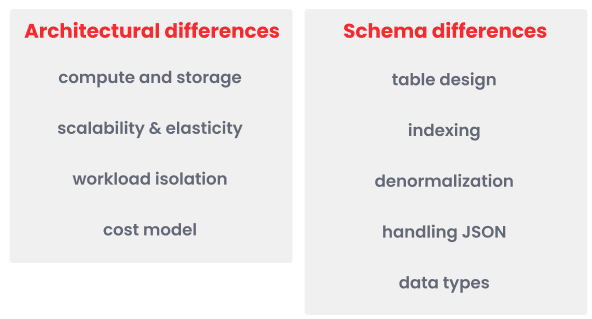
Architectural differences
Migrating from Amazon Redshift to Firebolt requires adapting to a different architecture. Redshift’s monolithic cluster model, where compute and storage are tightly integrated, limits flexibility and forces full-cluster scaling. In contrast, Firebolt separates compute engines from storage, enabling elastic scaling, workload isolation, and advanced indexing for faster performance, as summarized in the following table:
The following sections outline key differences in compute and storage, scalability and elasticity, workload isolation, and cost model, to help you optimize Firebolt for both speed and efficiency.

Compute and storage

TYPE is critical to optimizing performance and cost efficiency. Unlike Redshift, where all workloads run on the same cluster, Firebolt lets you assign separate engines for ingestion, analytics, and transformation tasks. To maximize efficiency, engines should be right-sized based on workload needs, scaled independently of storage, and paused when not in use to reduce costs.
Firebolt allows scaling compute without affecting storage, unlike Redshift, where storage grows with compute. You can allocate more compute resources for analytics while keeping storage unchanged. Use smaller engines for intermittent workloads.
The following code example shows how to scale an engine for high-currency analytics in Firebolt:
Scalability and elasticity

The following table outlines the recommended Firebolt engine configurations for different workloads, ensuring optimal performance, scalability, and cost efficiency:
The following code example shows how to resize an existing engine for higher concurrency in Firebolt:
Workload isolation

- Firebolt engines support both read and write operations on shared data while maintaining strong consistency across engines, eliminating the need for manual synchronization.
- Firebolt optimizes workload execution dynamically based on configuration, resource utilization, and query history. This helps balance latency and throughput, ensuring that resources are used efficiently.
The following table provides recommended Firebolt engine configurations for different workloads, ensuring optimal performance, scalability, and cost efficiency:
The following code example shows how to create different engines with different sizes to separate data loading and analytics workloads in Firebolt:
Cost model
Firebolt engines consume credits only when engines are running, so pausing unused engines can significantly reduce costs. In Redshift, charges are based on cluster uptime, even if it is idle. In Firebolt, you can pause an engine without losing access to stored data.
The following code example creates an engine that automatically pauses after 30 minutes of inactivity in Firebolt:
Schema differences
Migrating from Amazon Redshift to Firebolt requires adapting your schema to leverage Firebolt’s indexing model, denormalization benefits, and optimized query execution. Unlike Redshift, which relies onSORT and DIST keys for performance tuning, Firebolt automatically optimizes queries using primary, and aggregating indexes. This eliminates the need for manual data distribution and sorting, reducing complexity while improving performance.
Additionally, semi-structured data handling differs. Redshift’s SUPER type allows nested JSON storage, while Firebolt stores JSON as TEXT, enabling flexible querying with JSON functions like JSON_VALUE and JSON_EXTRACT. Firebolt’s schema design also favors denormalization, reducing the need for complex joins and improving analytical query speed.

Table design

The following code example shows a normalized Redshift schema using separate tables for
orders and customers:
customer_id primary index, scanning only relevant data:
Indexing

SORTKEY and DISTKEY to improve data distribution and query performance. The SORTKEY controls the physical order of stored data, optimizing filtering and range-based queries. The DISTKEY distributes data across cluster nodes to balance workloads. These keys require careful, manual tuning and must be set during table creation. Changing them requires rebuilding tables and reloading data, making schema adjustments rigid and time-consuming.
Poor DISTKEY choices in Redshift can lead to data skew, where some nodes store more data than others, creating performance bottlenecks. Additionally, scaling Redshift clusters requires redistributing data based on the defined DISTKEY. This process can result in downtime and degraded performance while workloads rebalance, and often forces additional manual optimization.
Firebolt eliminates manual distribution keys and sort keys by using dynamic indexing to optimize query processing. Indexes in Firebolt can be added, modified, or replaced without reloading data. Primary indexes physically organize data to speed up filtering and scanning during query runtime. Aggregating indexes precompute aggregate results, allowing faster retrieval without dynamic calculations.
Firebolt’s indexing model works with tablet-based storage, reducing the need for manual tuning tasks such as VACUUM and ANALYZE in Redshift. The decoupled compute-storage architecture allows dynamic data access without requiring distribution keys or physical data redistribution when scaling. Indexes enable the engine to prune irrelevant data and improve query performance automatically.
Understanding how indexes and tablet-based storage replace Redshift’s DISTKEY and SORTKEY is essential for successful schema migration. Firebolt’s indexing approach simplifies schema design, reduces maintenance overhead, and delivers faster query performance with greater flexibility.
The following code example shows a Redshift schema that creates a
sales table that distributes data by customer_id (DISTKEY) for optimized joins, sorts rows by sale_date (SORTKEY) for faster range queries, and defines a customers table with customer_id as the primary key for relational integrity. In Redshift, the primary key is informational only and not enforced at the database level:
DISTKEY(customer_id)is replaced with the aggregating index(customer_id, SUM(total_amount)). This aggregation runs faster than Redshift becauseSUM(total_amount)is precomputed in the aggregating index.SORTKEY(sale_date)is replaced with the primary index(sale_date).
DISTKEY in Redshift partitions data across nodes by game_id. Firebolt’s primary index on GameID and PlayerID allows the engine to quickly prune data during query processing, achieving similar optimization without manual distribution.
In Redshift, the following schema uses DISTKEY and SORTKEY for the playstats table:
GameID or PlayerID so that the query scans over only this index:
Denormalization

In Redshift, retrieving customer names for each order typically requires joining separate
orders and customers tables as follows:
customer_name directly in the orders table:
customer_name column is stored directly in the orders table, eliminating the need for a join and reducing query complexity.
Handling JSON

TEXT, allowing dynamic field extraction without predefined schemas. Firebolt includes specialized JSON functions to extract, convert, and manipulate JSON data stored in TEXT columns, enabling flexible and efficient querying without predefined structures. Unlike Redshift’s SUPER type, which requires fixed structures and functions like JSON_EXTRACT_PATH_TEXT, Firebolt enables flexible querying with JSON_VALUE, JSON_EXTRACT, and JSON_POINTER_EXTRACT_TEXT. These functions retrieve only the necessary JSON fields, reducing scan time and improving performance.
Firebolt’s approach removes the need for manual schema updates, simplifies query logic, and supports dynamic key lookups without restructuring the data model. Queries are easier to write and maintain because Firebolt avoids the nested function calls required in Redshift. By replacing SUPER with TEXT, users gain a more efficient and flexible way to query JSON data.
In Redshift, tables may store JSON data using the
SUPER type as follows:
TEXT, by unloading to Amazon S3 in JSON or CSV format. Then, define the column in Firebolt as TEXT as follows. It allows you to load JSON content into Firebolt as plain text and query it using Firebolt’s JSON functions.
JSON_VALUE as follows:
CONCAT:
Data types

SUPER for semi-structured data and fixed-length CHAR or VARCHAR columns, while Firebolt stores JSON as TEXT and uses TEXT for variable-length strings without length restrictions. Understanding these differences helps ensure consistent schema conversion and accurate query results when migrating.
The following table shows common Redshift data types and their Firebolt equivalents to help you adjust column definitions during schema migration:
Example schema conversion
The following example shows how to convert a Redshift table to a Firebolt dimension table with type adjustments and a primary index:
In Redshift, the following code example creates a
players table with columns for player_id, nickname, registration date, and score using specified data types:
players dimension table with columns for PlayerID, Nickname, registration date, and Score, and defines a primary index on PlayerID to optimize filtering and lookups.:
Steps to migrate from Redshift to Firebolt
- Export data from Redshift
- Load data into Firebolt
- Translate queries into Firebolt
- Validation, testing, and optimization
- Automated migration
Export data from Redshift

-
Use Redshift’s
UNLOADcommand to export tables or query results to Amazon S3. The following code example unloads thesalestable data in CSV format to the specified Amazon S3 bucket: -
Format data for Firebolt as follows:
- Ensure that exported data is in CSV or Parquet format.
- Include headers in CSV files for clarity during loading.
- Use Parquet with Snappy compression for faster loading.
- Compress CSV files with gzip compression to reduce storage and speed up transfer.
- Use consistent delimiters and avoid special characters that may cause parsing errors.
- Validate that exported data types match the expected Firebolt schema.
-
Organize files in Amazon S3 for parallel loading.
- Store exported files in Amazon S3 folders using clear prefixes, for example:
s3://your-redshift-data/sales/2024/01/. - Use multiple small-to-medium sized files of 100 MB to 1 GB each to maximize parallel loading in Firebolt.
- Follow consistent naming conventions including table names, export dates, or partitions.
- Clean up any incomplete or partial exports to avoid loading invalid data.
- Store exported files in Amazon S3 folders using clear prefixes, for example:
Load data into Firebolt

tournaments table in Firebolt, mapping specific columns from the file to the table’s fields and including metadata such as the source file name and timestamp:
Translate queries into Firebolt

- Window functions – Learn how to translate window functions from Redshift to Firebolt and optimize them using Firebolt’s indexing features for improved performance.
- Aggregation queries – Discover how to handle aggregation queries, leveraging Firebolt’s aggregating indexes to precompute results and significantly speed up query performance.
- JSON data – Understand how to work with JSON in Firebolt using its specialized functions, providing more flexibility and efficiency compared to Redshift’s approach.
- Query plan insights – Gain insights into query plans and how Firebolt’s EXPLAIN (ANALYZE) command helps optimize queries through runtime metrics for optimal performance.
Translate window functions into Firebolt

ROW_NUMBER, RANK, and SUM with the OVER clause, but Firebolt can enhance performance through indexing, particularly primary indexes, which minimize the data that needs to be processed.
The following example shows how to calculate a running total of player scores by game in both Redshift and Firebolt, using the SUM window function.
In Redshift, the query to calculate the running total of the currentscore for each playerid within each gamid ordered by playerid, using a window function:
PlayStats table in Firebolt with columns for gameid, playerid, and currentscore. It defines a primary index on gameid and playerid to optimize query performance, such as the running total calculation, by efficiently retrieving the relevant rows based on these columns:
Translate aggregation queries into Firebolt

SUM, COUNT, and AVG, and the GROUP BY clause. Firebolt, however, enhances performance by precomputing and storing aggregated results through aggregating indexes, which reduce the need for runtime calculations.
The following example shows how to calculate the total playtime by game in both Redshift and Firebolt using the SUM aggregate function.
In Redshift, the following code calculates the total currentplaytime for each gameid in the PlayStats table by grouping the data by gameid and summing the currentplaytime for each group:
gameid, avoiding runtime aggregation.
The following code example creates an aggregating index on the PlayStats table, precomputing the sum of currentplaytime for each gameid, which optimizes query performance by storing the aggregated results for faster retrieval:
JSON data in Firebolt

TEXT columns. Unlike Redshift’s SUPER data type, which requires predefined structures, Firebolt allows users to work with raw JSON data directly, offering significant advantages in both performance and flexibility.
Firebolt’s JSON functions are divided into three main categories:
- Extract functions – Used to retrieve specific parts of a JSON document.
- Convert functions – Used to convert JSON data into SQL-compatible types like
TEXTorARRAY. - Hybrid functions – Combine extraction and conversion in one step, especially useful for nested JSON elements.
- JSON_EXTRACT – Extracts a part of the JSON data as raw JSON.
- JSON_POINTER_EXTRACT_VALUES – Extracts values from a JSON document using a pointer to the desired location.
TEXT or ARRAY. Key convert functions include the following:
- JSON_VALUE – Extracts a JSON value and converts it to a SQL-compatible format like TEXT.
- JSON_VALUE_ARRAY – Converts a JSON array into an array of SQL-compatible values.
- JSON_POINTER_EXTRACT_KEYS – Extracts keys from a JSON document.
id key from the nested metadata object in the event_data JSON column of the events table and returns it as user_id:
JSON_POINTER_EXTRACT_TEXT to extract values from nested JSON objects using JSON pointer expressions as follows. The following code example extracts the value of the id key from the nested metadata object in the event_data JSON column of the events table and returns it as user_id:
event_data JSON column in the events table, accessing keys with the tilde and slash special characters by using escape sequences and returning them as key_with_tilde and key_with_slash:
Firebolt’s query plan insights

EXPLAIN command provides a static query plan, showing the sequence of operations, estimated costs, and resource allocation. This plan lacks runtime performance metrics and detailed insights into data movement across nodes.
In Redshift, the following code example analyzes a join query:
- The logical plan outlines the structure of the query, including projections, filters, and joins.
- The physical plan reveals how these operations are distributed across nodes, with details on data shuffling and execution strategies.
EXPLAIN command adds runtime metrics, such as CPU time, thread time, rows processed, and runtime for each operation, allowing for detailed performance analysis.
In Firebolt, the following code example analyzes the same query and provides runtime metrics:
Validation, testing, and optimization

Validate data consistency

playstats table in both Redshift and Firebolt:
GROUP BY in both Redshift and Firebolt:
NULL values, large datasets, and complex joins. This ensures that data migration doesn’t introduce errors in rare or complex scenarios.
The following code example shows complex joins from multiple tables in Redshift and Firebolt:
NULL values are handled in both Redshift and Firebolt:
UNION ALL to increase the size of the playstats table in Redshift and measures the runtime and resource usage:
Performance testing

EXPLAIN and STV_RECENTS to evaluate query performance and resource consumption.
The following code example measures query runtime, resource usage, and queue time in Firebolt. Rerun it using different cluster sizes:
Engine optimization

Automate migration

Automate data migration with Airflow

aws_access_key_id, aws_secret_access_key, and s3_redshift_data_bucket variables for your migration tasks. For more information, see the Apache Airflow documentation on variables.
Use Airflow to run Redshift’s UNLOAD command on a scheduled basis to export data from Redshift tables to Amazon S3 as follows:
Automate data migration with dbt

SORTKEY and DISTKEY into Firebolt’s primary and aggregating indexes. Create dbt models to define Firebolt-compatible schemas and apply them automatically.
The following code example uses dbt to create a Firebolt schema:
SUPER to TEXT for JSON handling as follows: